CLZ Comics comic book database
- 4.8
- Rating
- 100.00K
- Installs
- Free
- Price

 Analysis by App-foxy
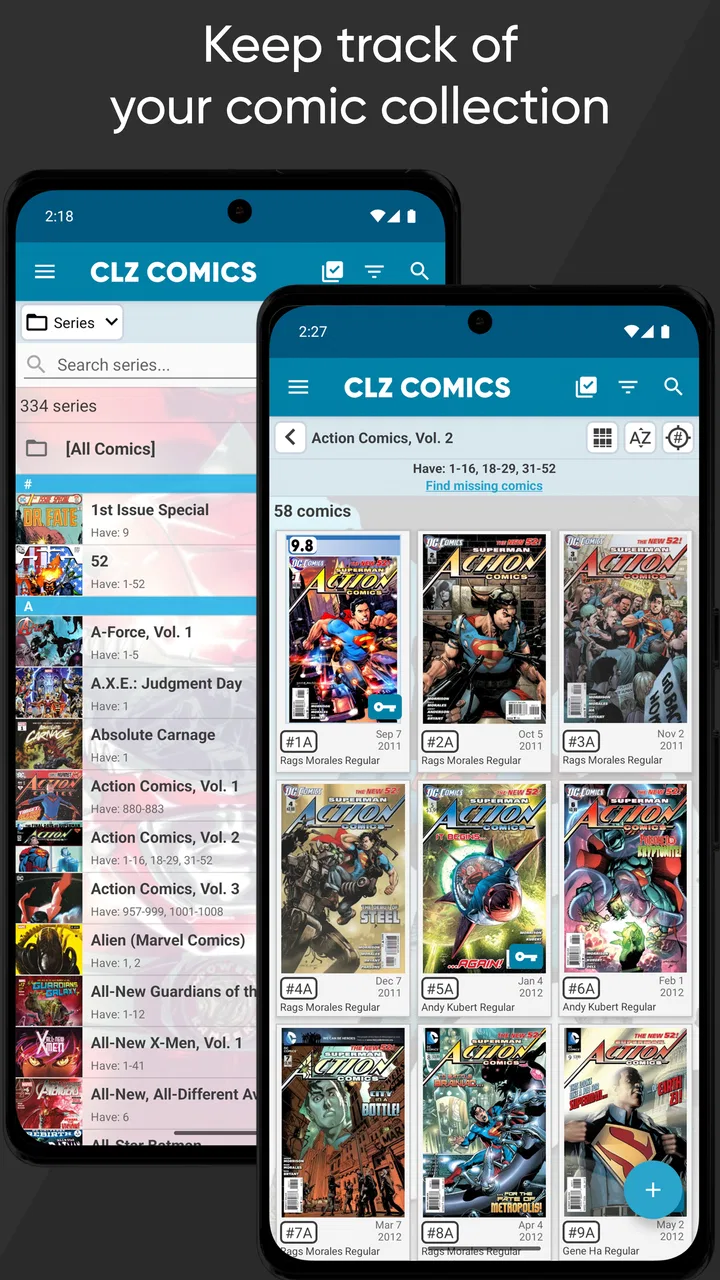
I have always found that owning comics and keeping track of comics are two very different hobbies. The first is enjoyable; the second can become a small administrative job once boxes multiply, editions look alike, and memory stops being reliable. CLZ Comics is built for that exact problem. It is a comics cataloging app from CLZ that lets me build a personal database around the books I own, rather than treating my collection as a simple list of titles.
After spending time with it, my impression is clear: this is aimed at collectors who want structure, useful search tools, and a faster way to enter books than typing every detail by hand. It is not really a reading app, a comics storefront, or a recommendation feed. Its value appears when I need to answer practical questions such as which issue I own, which volume is missing, where a particular book is stored, or whether I am about to buy a duplicate.
The app sits in the Comics category and is free to install, with in-app purchases ranging from $1.99 to $89.95 per item. The store summary presents the central idea simply: catalog a collection by scanning covers with the device camera. In everyday use, that scanning approach is the feature that most changes the experience, although it works best when I treat it as a starting point rather than a substitute for checking each entry.
You May Also Like

 Blood Strike: 2.5 Anniversary
Blood Strike’s Loadouts Turn Every Drop Into a Tactical Gamble
A close look at Blood Strike’s custom loadouts: how fast access to signature weapons reshapes its battle royale rhythm, rewards preparation, and narrows the gap between fights.

 Pandora - Music & Podcasts
Pandora’s Music Is Easy to Start, but Harder to Recover
Pandora’s strength is its low-effort path from a seed to a station. Its weak spot is how much confidence it asks you to place in connection, setup, and quiet recovery.

 8 Ball Pool
 Is Built on Rivalries, Rematches, and Routine
A close look at the rivalries, rematches, shared routines, and unanswered safety questions that turn a quick pool match into a persistent mobile community.

 Samsung Music
’s Quiet Strength Is Playing What You Already Own
Its reach comes less from spectacle than from dependable access to a personal library. That simplicity is both the app’s strongest retention engine and its ceiling.

 AccuWeather: Weather Radar
AccuWeather Review: A Quick, Clear Forecast for Everyday Decisions
For everyday plans, the best forecast is the one you can understand quickly. AccuWeather makes rain timing, radar, and local conditions easy to act on, with a few trade-offs.

 Hill Climb Racing
Why Hill Climb Racing Still Turns Crashes Into One More Run
A tiny car, a bumpy hill and one more upgrade: Hill Climb Racing keeps resurfacing because its simple chaos makes every near-miss feel personal.
More From Our News Desk



What using CLZ Comics feels like today
The first useful distinction is between adding a comic and maintaining a collection. Adding is the attention-grabbing part because the camera can identify a cover and reduce the amount of typing. Maintaining is where the app earns its place: correcting an edition, organizing a run, recording ownership, and making the collection searchable later.
I would not approach this as a tool for a casual reader who buys a few digital issues and moves on. It makes more sense for someone with physical comics, trade paperbacks, graphic novels, or a growing mixture of formats. The more uncertain my own memory becomes, the more valuable a catalog becomes. A collection can be modest and still benefit if the books are spread across shelves, storage boxes, and a bedside stack.
The basic workflow is pleasantly direct. I can use the camera to scan covers, review what the app recognizes, and then refine the record. That last step matters. Similar covers, variant editions, collected volumes, and reprints can look close enough to confuse an automated lookup. I would rather spend a few seconds checking a result than discover months later that my database says I own a different edition.
One practical habit makes the process much safer: I add comics in small batches and inspect the list before moving on. When I scan a long box all at once, it is easy to overlook one wrong match. Working shelf by shelf also gives me a natural way to keep physical storage and digital records aligned. I can finish a box, confirm the entries, and then move to the next one instead of creating a large cleanup project.
The search side is just as important as scanning. A collector usually does not need a catalog merely to admire a total. The useful moment comes when I am standing in a shop, looking at a run, and want to know whether an issue is already at home. A well-maintained database turns that decision into a quick lookup instead of a guess.
Scanning is fast, but review is part of the job
The camera is the app’s most approachable feature, especially for a collection that would be tedious to enter manually. Still, I would not describe scanning as a completely hands-off process. Lighting, cover condition, glare, unusual editions, and similar artwork can all affect recognition. The smart workflow is scan first, verify second, and correct immediately while the physical comic is still in front of me.
That approach also helps with one of the less obvious collector problems: duplicate records. If I scan the same issue twice during a hurried session, I can end up with a database that looks more complete than the shelf really is. I found it better to use a simple physical rhythm, such as placing scanned books on a separate surface and returning them only after the entries have been checked.
Another useful tip is to catalog the awkward books deliberately. Annuals, special issues, collections, and books with several similar covers are exactly where a quick scan is least trustworthy. They take more attention, but entering them carefully prevents later confusion when I am sorting a series or deciding what to buy.
Where the database becomes more useful than a spreadsheet
A spreadsheet can record titles and issue numbers, and for a tiny collection it may be enough. The advantage of a dedicated app is that the comic is treated as a catalog item rather than a line of text. That difference becomes noticeable when I need to browse a series, distinguish related editions, or search from several directions.
I also prefer a specialized database when I am cataloging while holding the physical books. A spreadsheet often makes me think about columns and formatting before I can think about the collection itself. CLZ Comics keeps the task closer to the object in my hands: identify it, check it, place it in the right part of the collection, and move on.
That does not make a spreadsheet useless. Someone who wants complete control over custom fields, unusual inventory rules, or a collection shared across many unrelated hobbies may prefer a flexible table. The trade-off is that a spreadsheet requires more setup and more discipline. For comics specifically, the dedicated approach feels more natural to me.
Everyday situations where it earns its place
The clearest real-world example is a visit to a comic shop or convention. I can search before buying instead of relying on a vague memory of a cover. This is especially helpful for long-running series, where the difference between having an issue and missing an issue is easy to lose track of. It also reduces the awkward habit of buying a duplicate simply because the cover looks unfamiliar.
Another scenario is reorganizing a home collection. If I move books between shelves or boxes, the catalog gives me a reference point while I work. I can use a consistent physical order, such as publisher, series, or personal preference, and make the digital record reflect that system as I go. The important part is choosing an arrangement I will actually maintain; a perfect plan that is never updated is less useful than a simple one.
It can also help when lending comics. I would still keep my own note of who has a book, but a catalog makes it easier to identify the exact issue or volume before it leaves the house. That precision matters when several books share a character, title, or similar cover design.
For insurance or moving preparation, a catalog can provide a much better starting point than memory. I would not treat the app alone as a complete valuation record, since collecting and pricing involve details that can change, but having an organized inventory is much better than trying to reconstruct one after a loss or relocation.
The experience for existing collectors
If I already have a large collection, the main challenge is not learning the interface. It is deciding how much historical detail I want. I can begin with the books I own now and add older boxes gradually, or I can attempt a complete catalog from the beginning. The first route gives faster results; the second creates a more satisfying archive but demands patience.
My recommendation is to start with the collection I use most often: the current shelf, the series I actively follow, or the boxes I regularly take to shops. That produces immediate value and teaches me how much correction the scanning workflow needs. Once the process feels comfortable, I can work backward through less accessible storage.
Collectors who have already used another database should think about migration before committing to a full rebuild. The important questions are practical: can the existing records be transferred in a useful form, how much cleanup will be needed, and which details matter enough to preserve? If the previous system contains years of carefully customized notes, moving may be more work than starting fresh with a smaller active collection.
For a new collector, the opposite advice applies. Starting early is easier than reconstructing purchases later. Even if I only record the essentials at first, a consistent habit prevents the familiar problem of owning a pile of comics that I intend to catalog someday but never quite do.
What the current version says about the product’s direction
The current version is 10.7.2, which gives the app the feel of an established product rather than a newly assembled experiment. It was released on December 6, 2010, so its long presence in the market is part of the context. I see that history in the product’s focus: it is built around the continuing needs of collectors, not around a temporary trend in comic discovery.
That maturity has two sides. On the positive side, the central workflow feels well defined. Scanning, cataloging, and retrieving collection information are clear priorities. On the negative side, an established cataloging app can feel more utilitarian than modern entertainment apps. I would choose it for dependable organization, not for visual excitement or a social browsing experience.
The developer is CLZ, and the app has an average rating of 4.8 from around fifteen thousand ratings, with more than four thousand written reviews. It has passed one hundred thousand installs and is rated Everyone, which fits the straightforward inventory purpose. Those figures suggest that the app has found a stable audience, but they do not remove the need to decide whether its cataloging style matches my own habits.
The free entry point is useful for trying the workflow before deciding how seriously to build a collection around it. The store summary mentions a yearly cost of twenty US dollars, while the app also lists in-app purchase items across a wider range. I would check the purchase screen carefully and think about the long-term cost before scanning a very large collection. The right question is not just whether the first download is free, but whether the ongoing value justifies paying for the way I intend to use it.
Limitations that matter before committing
The biggest limitation is the unavoidable need for human checking. Cover scanning is convenient, but it cannot understand every collector distinction perfectly. A damaged cover, a variant, a special edition, or a collected book that resembles another entry can require manual attention. Anyone expecting to point a camera at an entire room and receive a flawless catalog will be disappointed.
There is also a time investment that becomes more noticeable with a large backlog. The app reduces typing, but it does not eliminate the work of deciding what counts as part of the collection, resolving duplicates, and keeping records accurate after new purchases. Cataloging is a habit, not a one-time button press.
Another trade-off is specialization. The app is a strong fit when the collection itself is the focus. It is less compelling if I mainly want to read comics, discover new stories, track a reading queue, or manage books from many categories in one place. A general inventory tool may be better for a mixed household archive, while a reading-focused service may be better for someone whose main question is what to read next.
I would also be cautious about adopting it solely for speculative value tracking. A catalog can help me remember what I own, but ownership information and market value are different jobs. Prices depend on condition, edition, demand, and timing. The app is most convincing when I use it as an organized collection record rather than expecting it to make collecting decisions for me.
Questions I would settle before installing
Will it work for a small collection? Yes, but the benefit depends on whether I expect the collection to grow or whether I frequently forget what I own. If I have only a handful of comics and can see them all at a glance, a dedicated catalog may feel like extra ceremony. Once duplicates or storage boxes become a problem, the balance changes.
Is scanning enough on its own? No. It is the quickest way to begin, but I would inspect every match that affects a purchase decision or a valuable part of the collection. A careful scan-and-check routine is more reliable than treating the camera as an authority.
Can it replace a spreadsheet? For a focused comics collection, it may be more convenient and more natural. It is not automatically better for someone who needs unusual fields, complex shared inventories, or a single database covering comics alongside unrelated possessions. The choice comes down to whether convenience and comic-specific structure matter more than total customization.
Is the free installation enough for serious use? It provides a low-risk way to understand the workflow, but the purchase model deserves attention if I plan to catalog extensively. I would test the parts I use most, estimate the effort of entering the backlog, and then decide whether the paid option makes sense for my collection rather than assuming the free label tells the whole story.
Will it suit digital-only readers? I would be selective here. The strongest reason to use it is keeping an organized record of owned comics, particularly physical ones. If my main activity is reading inside another service, discovering recommendations, or tracking a temporary reading list, a different app category may fit better.
What I would watch as the collection grows
For existing users, the most important measure of progress is not a flashy new screen. It is whether catalog maintenance becomes easier and whether corrections remain manageable as the library expands. I would watch how smoothly the app handles unusual editions, duplicate prevention, and the small details that separate a useful collector’s record from a long list of approximate matches.
I would also pay attention to the balance between scanning speed and catalog accuracy. Faster entry is valuable only when it does not create a cleanup burden later. Improvements that help identify difficult covers, review uncertain matches, or edit several related records efficiently would have a direct effect on everyday use.
The subscription and purchase structure is another area worth watching. Collectors tend to invest time gradually, and the cost feels different after a small trial than after a large catalog has become dependent on the service. I would want the value to remain clear for both newcomers and people who have already spent considerable effort organizing their shelves.
My final view is favorable, with a specific qualification: CLZ Comics is best understood as a serious collection-maintenance tool, not a general comics entertainment app. I like the way it turns a camera scan into a searchable inventory, and I appreciate that it addresses a real problem collectors face at home and while shopping. The need to verify entries and maintain the catalog is genuine friction, but it is manageable when I work in small batches and establish a routine.
I would recommend it to a physical-comics collector who wants fewer duplicates, a clearer view of missing issues, and a practical way to organize shelves or boxes. I would skip it if I only want to read, browse recommendations, or keep a highly customized database spanning many kinds of possessions. For the right user, the app’s strongest feature is not the scan itself; it is the confidence that comes from knowing what is actually in the collection before the next purchase.
Because it supports Android 6.0 and later, it remains accessible to users with older compatible devices, while the Everyone rating makes its intended audience broad. The current version, 10.7.2, continues a product that has been around since 2010. I would start with a small, active section of my shelves, verify the results carefully, and only then decide whether the catalog is worth expanding into the rest of the collection.
FAQs for CLZ Comics comic book database
01What features does CLZ Comics offer to manage my comic book collection?
CLZ Comics offers a comprehensive suite of features for managing your comic book collection. Users can catalog comics by scanning barcodes, adding manually, or importing from existing lists. The app provides detailed comic book information, including cover art, creators, and story details. It also allows you to track your collection value, wish lists, and missing issues.
02Is CLZ Comics available on both Android and iOS platforms?
Yes, CLZ Comics is available on both Android and iOS devices. The app is designed to provide a seamless experience across both platforms, ensuring that you can manage your collection whether you are using a smartphone or a tablet. Regular updates keep the app compatible with the latest operating system versions and features.
03Does CLZ Comics require an internet connection to function?
While many features of CLZ Comics can be accessed offline, such as viewing your collection and most data entries, an internet connection is required for features like barcode scanning, cloud syncing, and accessing the latest comic book information from the online database. This ensures you have the most up-to-date information available.
04How much does CLZ Comics cost, and are there any additional fees?
CLZ Comics offers a subscription-based pricing model. Users can choose between a monthly or annual subscription to access premium features such as unlimited entries, cloud backup, and syncing across devices. While there is a free version available, it comes with limitations on the number of comics you can catalog. Pricing details can be found on the app's download page.
05Can I sync my CLZ Comics collection across multiple devices?
Yes, CLZ Comics allows you to sync your collection across multiple devices using the CLZ Cloud service. This feature ensures that your collection is always current, whether you’re using a smartphone or a tablet. The cloud service also acts as a backup, protecting your data from being lost due to device issues.
Pros
- Comprehensive catalog of comic titles.
- Easy-to-use barcode scanner feature.
- Customizable collection views.
- Offline access to your collection.
- Regular updates with new features.
Cons
- Requires subscription for full features.
- Limited integration with digital comics.
- Occasional syncing issues reported.
- No option for custom tags.
- Lacks support for multiple collections.

CLZ Comics comic book database
Gallery